
My Digital Darkroom
Photography doesn’t end when I press the shutter. In many ways, that is where the second half of the creative process begins.
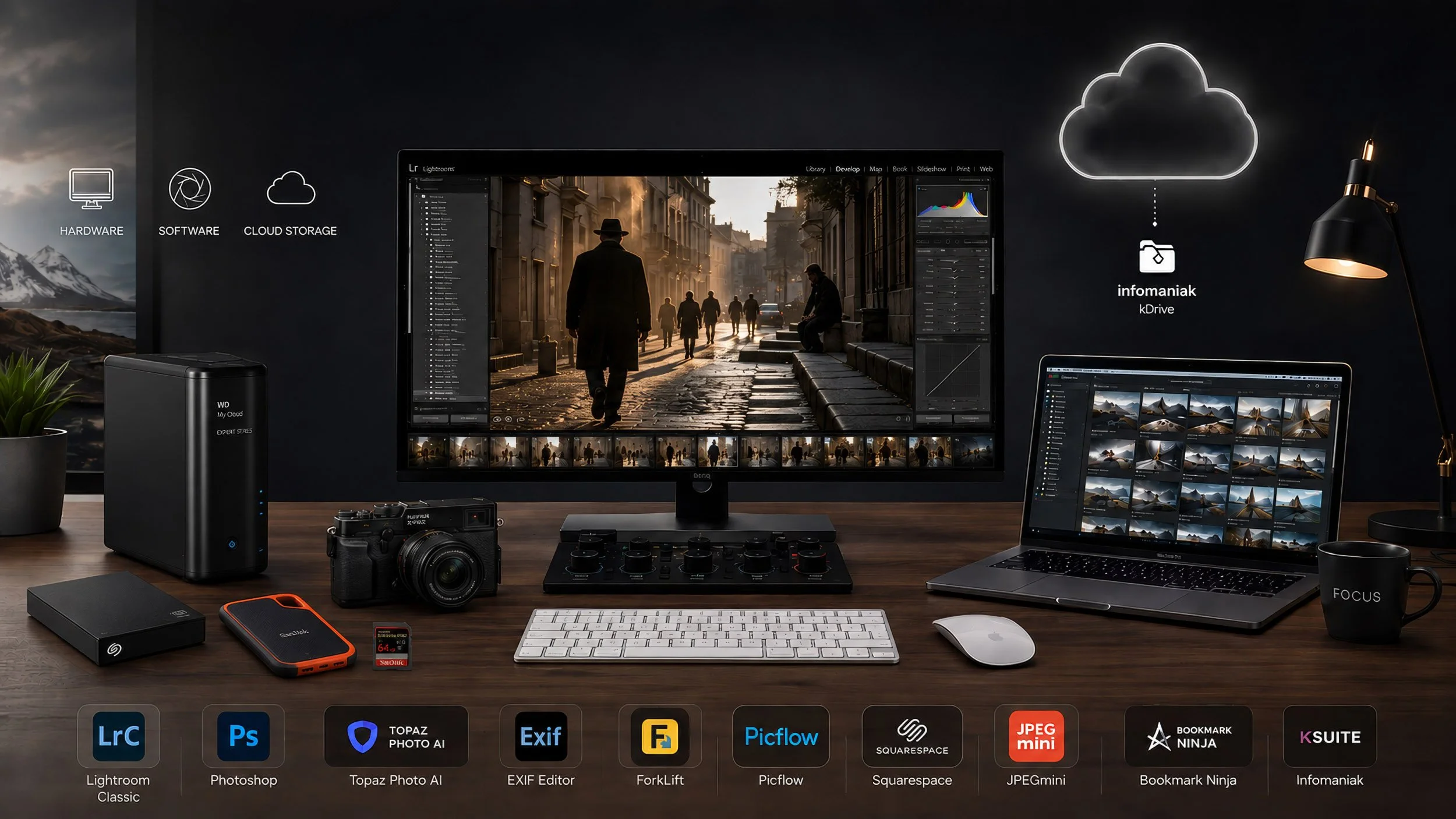
Hardware & Software Behind My Photography
My digital workspace is where photographs are selected, refined, organised, protected and prepared for their final destination — whether that is a fine art print, publication, client delivery, exhibition or online gallery.
Over the years, I have built a workflow around hardware and software that helps me work efficiently without getting in the way of the image itself. Programs such as Adobe Lightroom and Photoshop form the heart of my editing process, while Photo Mechanic helps me quickly review and select large numbers of photographs. Tools such as Topaz Photoprovide additional options for image enhancement, while Exif Editor and JPEGmini help me manage metadata and optimise finished files.
The computer hardware behind all of this is equally important. A reliable computer, accurate monitor and fast storage allow me to work with large RAW files while keeping my growing photographic archive organised and accessible.
For me, technology should never determine what a photograph becomes. It should simply provide the tools to bring the image I saw — and the story I wanted to tell — to its final form.
The camera captures the moment. The digital darkroom helps me complete it.
My Computer Hardware
MacBook Pro 16" laptop
The heart of my digital darkroom.
I am a huge Mac fan so I have a Macbook Pro, but the computer is just a tool so use what you're most comfortable with, and that is within your budget.
My 16-inch MacBook Pro with Apple M1 Pro is a combination of speed, reliability and an excellent display. It allows me to work smoothly with large RAW files and demanding applications such as Lightroom and Photoshop.
Whether I am selecting images, making subtle tonal adjustments or preparing photographs for print, the MacBook Pro gives me the performance I need without getting in the way of the creative process.
For me, it is more than a computer — it is where the captured image becomes the finished photograph.
Monitor BenQ PD2700U
Seeing the Image Clearly
My BenQ PD2700U 27-inch 4K monitor is an essential part of my digital darkroom. Its high resolution and accurate colour reproduction allow me to evaluate every detail, from subtle textures and shadow tones to the fine nuances of colour.
For editing in Lightroom and Photoshop, a reliable monitor is just as important as the camera itself. It helps me make precise decisions and ensures that my photographs remain consistent throughout the editing and printing process.
For me, the BenQ is where technical accuracy meets the visual character of the final image.
iPad 7 Mini
Creativity Beyond the Desk
My iPad mini 7 (2024, 128 GB) is the compact and mobile extension of my digital darkroom. I use it for reading photography books, visiting websites, exploring ideas and keeping my photography close at hand when I am away from my main workspace.
Its small size makes it particularly useful while travelling or working on location, while the high-quality display provides a convenient way to view and present my images.
For me, the iPad mini connects the digital darkroom with the freedom to work, review and create wherever photography takes me.
Seagate External HDD Sandisk 5Tb
Keeping the Archive Safe
My Seagate 5TB External Hard Drive plays an important role in the long-term storage and backup of my photography. With years of RAW files, finished images and ongoing projects, reliable storage has become an essential part of my digital darkroom.
Rather than speed, this drive is about capacity, organisation and preservation — providing a secure place for my growing photographic archive and an additional layer within my backup workflow.
Cameras and computers will eventually be replaced. The photographs they helped create are worth protecting for the future.
Sandisk Extreme Portable SSD 2Tb
Speed on the Move
My SanDisk Extreme Portable SSD 2TB is the fast and flexible part of my photography storage workflow. Its compact size and high transfer speeds make it ideal for storing active projects, transferring large RAW files and working with photographs directly from the drive.
Whether I am working in my digital darkroom or travelling with my photography, it gives me quick access to the images and files I need without adding unnecessary bulk.
For me, it combines speed, portability and convenience — keeping my current photography projects always within reach.
Sandisk Extreme
This is one place where I really only use the best brand and that is Sandisk. Full stop, end of discussion. I never had an issue with any Sandisk card! I also recommend avoiding all the other cheap ones on the market. It's not worth the risk. If a card fails you lose everything.
For the same reason, I recommend 64GB cardsover the larger ones (unless you are doing video then get bigger ones) because you don't want to put all your eggs in one basket. If you have a really big card and it gets corrupted or fails, you stand to lose more images. Or do as I do and shoot to camera both slots as a backup.
Also, get cards that have UHS-II capabilities (check that your camera is compatible) because they are a lot faster writing and reading. And you won't have to wait for the camera to save or buffer (if you get an error message about buffering it's a slow card issue).
My Computer Software
Photo Mechanic
From Capture to Selection
Photo Mechanic is an essential first step in my digital workflow, especially after assignments where I return with hundreds or even thousands of photographs. Its speed allows me to browse, compare and select RAW images almost instantly, without interrupting the rhythm of the editing process.
I use it primarily for culling, rating and organising my photographs before moving the final selection into Lightroom for further processing.
For me, Photo Mechanic is about one thing above all: spending less time waiting and more time deciding which images truly matter.
Adobe Lightroom Classic
The Heart of My Workflow
Adobe Lightroom Classic is at the centre of my digital photography workflow. It is where I organise my image archive, refine my selections and develop RAW files into photographs that reflect the way I experienced the original moment.
From subtle adjustments in light, colour and contrast to local corrections and final preparation, Lightroom gives me the control to shape an image without losing its natural character.
For me, editing is not about transforming reality, but about bringing the photograph closer to what I saw, felt and intended when I pressed the shutter.
Adobe Photoshop CC
Beyond the RAW File
Adobe Photoshop CC is where I take an image beyond the possibilities of RAW processing. I use it when a photograph requires more precise local adjustments, advanced retouching, layers, masks or creative techniques that cannot be achieved in Lightroom alone.
Photoshop also gives me the freedom to experiment — from subtle refinements to more interpretative fine art work where multiple elements, movement or moments can become part of a single image.
For me, Photoshop is not about creating perfection. It is about using digital tools with intention to strengthen the idea, atmosphere and visual story behind the photograph.
Topaz Labs Photo
Refining the Details
Topaz Photo is one of the final refinement tools in my digital workflow. I use it selectively to improve image quality through intelligent noise reduction, sharpening and enlarge, particularly when working with photographs made under challenging conditions.
Its AI-powered tools can help recover subtle detail and clarity while allowing me to maintain the natural character of the original photograph.
For me, Topaz is not about making an image look artificially perfect — it is about giving a strong photograph the technical refinement it deserves.
EXIF Editor
Keeping the Story Behind the Image
EXIF Editor helps me manage and refine the metadata that belongs to my photographs. I use it when I need to add, correct or update information such as copyright details, descriptions, keywords, dates and other image data.
Good metadata may be invisible when viewing a photograph, but it plays an important role in keeping a growing archive organised, searchable and properly documented.
For me, EXIF data is part of preserving a photograph’s history — not only the image itself, but also the information and context behind it.
JPEG Mini
Smaller Files, Same Visual Impact
JPEGmini is one of the final tools in my digital workflow, particularly when preparing photographs for my website and online use. It helps me reduce JPEG file sizes significantly while maintaining the visual quality of the image.
This allows my photographs to load faster online, use less storage space and keep my website responsive without unnecessarily compromising image quality.
For me, JPEGmini is about finding the right balance between image quality, efficiency and performance — because a photograph should make an impression, not keep the viewer waiting.
Forklift
Keeping My Files Under Control
ForkLift helps me manage the practical side of my digital photography workflow. With thousands of RAW files, edited photographs, project folders and backups spread across different drives, keeping everything organised is essential.
I use ForkLift to navigate, copy, move, rename and synchronise files and folders between my Mac and external storage, giving me a clear overview of where my photographs are stored.
It may work quietly behind the scenes, but for me, good file management is an important part of photography — because a well-organised archive keeps the creative process moving.
PicFlow
From My Screen to the Client
Picflow is an important part of the final stage of my photography workflow. I use it to create elegant online galleries where clients can view, select, comment on and download their photographs in a clear and professional environment.
It makes the process from final edit to delivery simple and efficient, while presenting my work in a way that reflects the care I put into the photographs themselves.
For me, Picflow is where the digital workflow reaches its destination — turning a collection of finished images into a professional and enjoyable viewing experience.
Squarespace
Where My Photography Comes Together
Squarespace is the platform behind my photography website and the place where my work comes together online. It allows me to combine portfolios, stories, articles and information about my photography within a clean and visually focused environment.
I particularly value the freedom to present different bodies of work in a consistent way, while keeping the photographs at the centre of the experience.
For me, Squarespace is more than a website platform — it is the digital space where I can share not only what I photograph, but also how I see the world.
Bookmark Ninja
Organising My Digital Inspiration
Bookmark Ninja helps me organise the growing collection of online resources that surrounds my photography. I use it to keep inspiring photographers, articles, tutorials, research, useful tools and reference websites organised and easy to find.
Instead of valuable information disappearing somewhere among countless browser bookmarks, it gives me a structured place to collect resources I may want to revisit later.
For me, it is a small but valuable part of my digital workspace — turning online inspiration into an organised library of ideas and knowledge.
KSuite from Infomaniak
My Digital Workspace
kSuite by Infomaniak provides the everyday digital tools that support the organisational side of my photography. I use it mainly for cloud storage of my photos / documents and file sharing (WeTransfer alternative), keeping communication and important information together within one secure environment.
While applications such as Lightroom and Photoshop are focused on creating the final image, kSuite helps me manage everything that happens around my photography — from correspondence and projects to documents and files.
For me, a good digital darkroom is not only about editing photographs. It is also about keeping the creative and practical sides of photography organised and connected.